The big picture
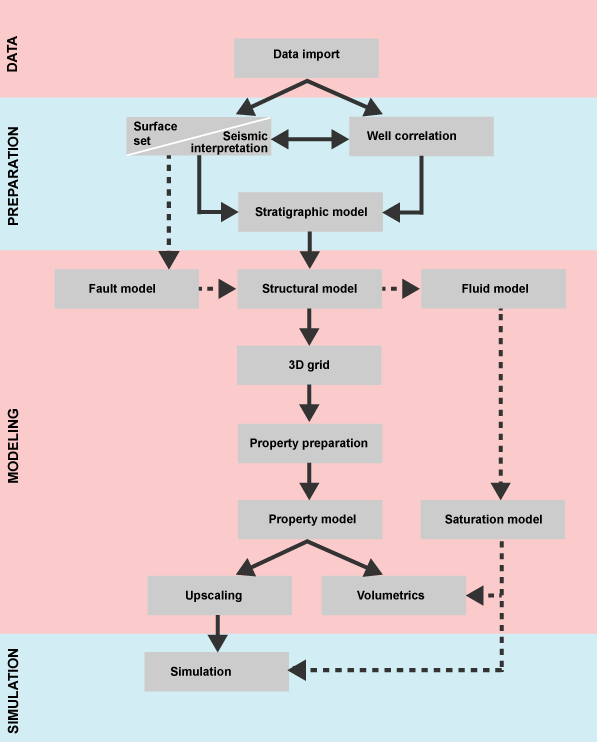
With JewelSuite Subsurface Modeling, you go from importing your data using the Data strip, to preparing your data for modeling with the Preparation strip, to creating models and 3D grids and volumetrics with the Modeling strip and finally to simulating the field with the Simulation strip click to enlarge
Your ultimate aim when using JewelSuite Subsurface Modeling will most likely be to create a reservoir model for volumetrics reports and/or perform reservoir simulations. Crucial to both of these is a high-quality representation of the subsurface - the 3D grid.
There are essentially two sources of data for this 3D grid: seismic data and well data. Alternatively, you might have additional data such as horizons and faults, that you want to analyze further or combine with your own data interpretations. JewelSuite Subsurface Modeling facilitates organizing and modeling this variety of data via its design, which reflects the following three main modeling phases: data import, data preparation and reservoir modeling, at the end of which your model can be used for volumetrics calculations and reservoir simulation.
After you have imported your data using the data strip, you can create, modify and quality control the input data for the static modeling process in the prepare strip. This includes a seismic interpretation, editing and resampling surface data, or converting time surface data into depth surface data. If you don't have seismic data, you create a surface set and geometrically edit and modify this data using various tools available via context menus or the strip. If you imported well data, you can use log and marker editing tools to perform well log correlation and create marker sets. Moreover, in the prepare strip you create a stratigraphic model where you set-up the hierarchy for the internal zonation of your model.
After you have prepared your input data, you can move on to the modeling strip. This strip contains guided workflows that take you step-by-step through the process of creating a static reservoir model. It includes fault modeling, structural modeling, fluid modeling, 3D gridding, property modeling and saturation modeling. You can create alternative scenarios for your static model which you can store in volumetric concepts with the concept strip. Volumetric concepts can be used to organize the oftentimes many models in your solution, and as input to calculations that you perform with the study strip, for example volumetric calculations. With the study strip you can incorporate uncertainties assigned to model parameters throughout the workflows as well as conceptual uncertainties assigned to volumetric concepts. Once having the static model ready, you can prepare your models for dynamic simulation with the simulation strip.
The nature of the workflows in the application makes it easy to work in an iterative way by enabling you to make additions and tweaks to your model as you develop insights and refine your data. With each iteration you can generate more accurate calculations, resulting in improved models and results.